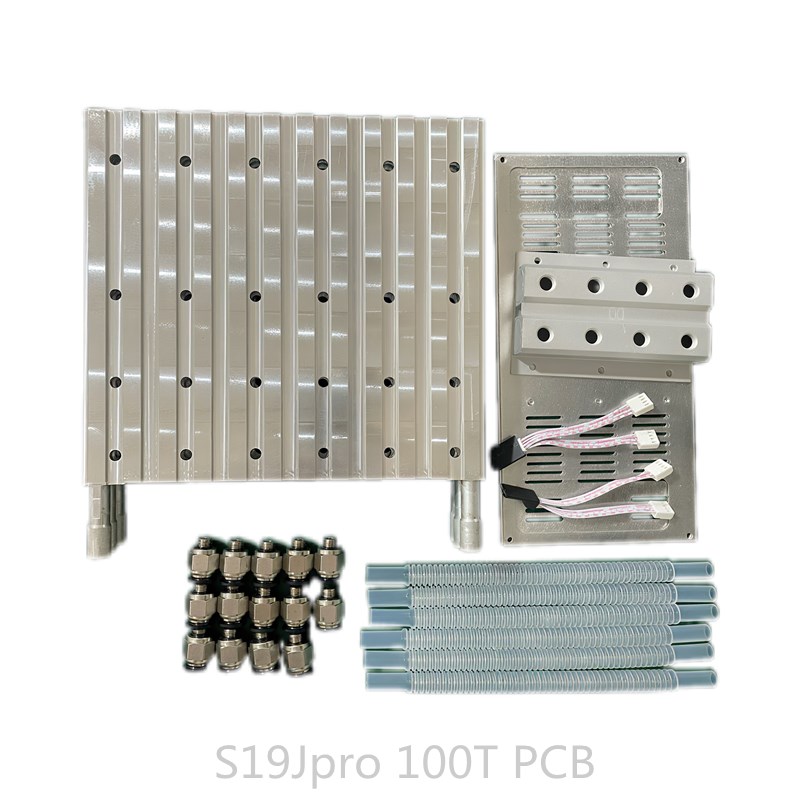
The S19Jpro 100T PCB water-cooled board kit is a specialized replacement and maintenance component intended for compatible water-cooled mining equipment. The control board plays an important role in coordinating communication, monitoring operating conditions, and supporting stable operation within the mining system. Selecting the right kit requires more than matching a product name. Buyers and maintenance teams need to consider board revision, hardware compatibility, connector layout, cooling-system condition, installation requirements, and quality control.
This guide explains the function of a water-cooled PCB board kit, the key compatibility checks to complete before purchasing, common maintenance concerns, and practical questions to ask a supplier. It also outlines how professional component selection and careful installation can help reduce downtime and improve maintenance efficiency.
1. Understanding the S19Jpro 100T PCB Water-Cooled Board Kit
Mining hardware operates under continuous workloads, making the reliability of its electronic components particularly important. A printed circuit board, commonly called a PCB, provides the electrical connections and control functions needed for different parts of a mining machine to work together.
The S19Jpro 100T PCB water-cooled board kit is designed for maintenance or replacement applications involving compatible S19Jpro 100T water-cooled equipment. It is relevant to mining farm operators, equipment repair centers, hardware distributors, and technicians who need replacement components for machine servicing.
Unlike a general-purpose circuit board, a mining equipment PCB must work within a specific hardware architecture. Its connectors, electrical characteristics, firmware requirements, and communication interfaces must correspond to the target machine. A board that looks similar may not necessarily be interchangeable.
Important purchasing principle: Confirm the exact machine model, board part number, hardware revision, and connection layout before placing an order. Product-name similarity alone is not sufficient evidence of compatibility.
For professional buyers, the goal is not simply to obtain a replacement board. It is to obtain a component that matches the equipment configuration, can be installed correctly, and is supported by clear product information.
2. What Does the PCB Board Do?
A PCB serves as an electronic platform that connects and coordinates different components. In mining equipment, the relevant control and interface boards may support communication, signal transmission, status monitoring, and system-level control functions.
Communication Between Electronic Components
Mining machines contain multiple electronic modules that need to exchange information. The PCB provides conductive pathways and interfaces through which signals can travel. Reliable connections help the machine maintain communication between supported components.
Operating Status and Signal Management
Depending on the specific board design, control circuitry may help process operating signals and communicate equipment status. This can support maintenance teams when checking whether the machine is operating normally or requires further inspection.
Supporting Equipment Maintenance
When a compatible PCB becomes damaged or unreliable, replacing the affected component may be part of restoring the machine. However, a replacement should only be installed after technicians have checked the surrounding wiring, power supply, connectors, and other possible causes of the fault.
It is important to distinguish between a control board and a complete mining machine. A PCB replacement does not automatically resolve problems caused by damaged power components, cooling-system failures, firmware issues, or other hardware faults.
3. How Water Cooling Affects Mining Equipment
Water-cooled mining equipment uses a liquid-based thermal management system to transfer heat away from designated components. Compared with conventional air-cooled configurations, water cooling can support a different approach to heat management and installation planning.
In a typical liquid-cooling arrangement, coolant circulates through designated channels or heat-exchange structures. Heat is transferred from the equipment to the coolant and then removed through an external cooling arrangement. The exact design depends on the machine and cooling system.
Why Cooling-System Condition Matters
Temperature management: Effective heat transfer helps keep equipment within its specified operating temperature range.
Maintenance planning: Coolant quality, flow conditions, seals, and connections should be checked as part of routine servicing.
Component protection: Preventing leaks and moisture exposure is important for protecting electronic assemblies.
A water-cooled PCB kit should not be assumed to include every part of the machine's cooling system. Buyers should check the supplied product list to understand whether the package contains only the PCB or also includes cables, connectors, mounting accessories, or other components.
Water cooling does not eliminate the need for electronic protection. Any coolant leak, condensation, or moisture near electrical components should be treated as a potential equipment risk.
4. Main Components and Their Functions
The exact contents of an S19Jpro 100T PCB water-cooled board kit depend on the supplier's configuration. A buyer should never assume that every listing includes the same accessories. The following table explains common elements that may be relevant when evaluating a PCB replacement package.
Component or Feature
General Function
What Buyers Should Check
PCB assembly
Provides electronic circuits and connection pathways.
Part number, board revision, appearance, and compatibility.
Connectors
Provide electrical or signal connections to compatible modules.
Connector type, pin arrangement, and physical condition.
Interface components
Support communication or signal interaction within the system.
Whether the interface matches the target machine configuration.
Mounting points
Allow the board to be secured in the intended position.
Dimensions, hole positions, and installation orientation.
Optional accessories
May assist with connection or installation.
Confirm the exact accessories included in the package.
For B2B procurement, a clear packing list is especially useful. It helps purchasing teams compare quotations accurately and prevents misunderstandings about whether additional cables, adapters, or installation materials need to be sourced separately.
5. Compatibility Checks Before Ordering
Compatibility is one of the most important considerations when purchasing replacement electronic boards. A product description that mentions S19Jpro 100T is a starting point, not a complete technical confirmation.
Confirm the Exact Equipment Model
Check the identification label and equipment documentation. Confirm that the machine is the intended S19Jpro 100T water-cooled version rather than another model or cooling configuration. Different variants may use different board layouts or electrical interfaces.
Compare Board Numbers and Revisions
Where possible, record the original board's part number and revision information. Send clear photographs of the front and back of the original board to the supplier. This allows the supplier to review visible markings and compare the physical layout.
Check Connectors and Wiring
Connector shapes, pin positions, cable arrangements, and connection locations should be checked carefully. Never force a connector into a socket or modify wiring simply because a replacement board appears similar.
Verify Firmware and Configuration Requirements
Some replacement boards may require specific firmware or configuration procedures. Buyers should confirm whether the board is supplied ready for the intended application, whether configuration is required, and who is responsible for any necessary setup.
Before ordering, provide the supplier with:
Full equipment model and cooling configuration.
Original board part number and revision, if available.
Clear photographs of the original board and connectors.
Details of the current fault or replacement requirement.
Required quantity and destination country.
6. How to Evaluate a Reliable Board Kit
For mining farms and equipment service providers, purchasing decisions should consider product consistency, technical communication, and after-sales support. A low quotation is not necessarily the best option if the product configuration is unclear or compatibility cannot be confirmed.
Product Identification and Traceability
A reliable supplier should be able to provide clear product identification information. This may include part numbers, revision details, product photographs, and a description of the supplied configuration. These details make it easier to identify the correct component during future maintenance.
Quality Inspection
Ask what inspection procedures are performed before shipment. Depending on the product and supplier's capabilities, inspection may include visual checks, connector inspection, solder-joint examination, and functional testing using suitable equipment.
Packaging and Transportation
Electronic boards can be vulnerable to electrostatic discharge, impact, dust, and moisture. Appropriate protective packaging is therefore important. Buyers should ask how the PCB is protected during storage and transportation, especially when ordering internationally.
Technical Communication
A supplier should be able to respond clearly to questions about model compatibility, product configuration, testing, and installation precautions. If a technical detail cannot be confirmed, it is better to request clarification than to rely on assumptions.
7. Installation and Replacement Considerations
PCB replacement involves electrical and electronic components, so installation should be performed by a qualified technician familiar with the equipment. Incorrect handling can damage the replacement board or other connected components.
Prepare the Equipment
Shut down the mining equipment according to the manufacturer's procedure.
Disconnect the power supply and verify that the equipment is in a safe, de-energized condition.
Allow relevant components to cool before opening the machine.
Inspect the work area for moisture, coolant leakage, dust, and other contamination.
Use suitable electrostatic discharge protection when handling the PCB.
Remove and Inspect the Original Board
Before removing the original board, document cable positions and connector orientations. Photographs can help technicians compare the original and replacement assemblies. Inspect the surrounding area for corrosion, damaged sockets, loose wires, or signs of overheating.
Install the Compatible Replacement
Compare the replacement board with the original unit before installation. Check its identification markings, mounting points, connector positions, and physical condition. Follow the equipment manufacturer's service instructions and the supplier's technical guidance.
Complete Post-Installation Checks
After installation, verify that connections are secure and that no tools or loose materials remain inside the equipment. A qualified technician should perform the appropriate startup checks and monitor system status according to the manufacturer's procedures.
Do not power on equipment if there is evidence of coolant leakage, condensation, damaged wiring, or an uncertain electrical connection. Resolve the underlying issue before returning the machine to service.
8. Maintenance Practices for Long-Term Reliability
Replacing a PCB is only one part of equipment maintenance. Regular inspection of the surrounding system can help identify conditions that may contribute to repeated failures.
Keep the Electronic Area Clean and Dry
Dust and moisture can create problems for electronic assemblies. Inspect the equipment enclosure and nearby connections according to the manufacturer's recommended maintenance schedule. Use appropriate cleaning methods and avoid applying liquids directly to the PCB.
Monitor Cooling-System Conditions
Check coolant circulation, hose connections, seals, and other cooling-system components. Follow the cooling-system manufacturer's guidance for coolant selection, replacement intervals, and operating conditions. Do not use an unapproved coolant simply because it is readily available.
Inspect Connectors and Cables
Loose connections, damaged insulation, and bent connector pins can lead to intermittent faults. During scheduled maintenance, technicians should inspect accessible wiring and connectors for visible damage or abnormal heating.
Keep Maintenance Records
Record the machine model, board revision, installation date, fault description, replacement history, and inspection results. These records help maintenance teams identify recurring issues and simplify future spare-parts procurement.
9. Common Problems and Troubleshooting
A machine that does not operate normally after a board replacement may have several possible causes. The PCB should not automatically be considered defective before the complete installation and system condition have been checked.
Observed Symptom
Possible Cause
Recommended Check
Machine does not start
Power supply issue, loose connection, or incompatible board.
Verify power conditions, connectors, and board identification.
Communication error
Connection problem, configuration mismatch, or interface fault.
Inspect signal cables and confirm configuration requirements.
Intermittent operation
Unstable connection, environmental issue, or another hardware fault.
Check connectors, wiring, temperature, and surrounding components.
Abnormal temperature
Cooling-flow issue, leakage, or temperature monitoring problem.
Inspect the cooling loop and follow equipment diagnostics.
Repeated board failure
Underlying electrical, thermal, or moisture-related problem.
Investigate the root cause before installing another replacement.
When troubleshooting, record error messages and operating conditions before changing multiple components. A systematic diagnostic process makes it easier to identify the actual cause and reduces unnecessary replacement costs.
10. A Practical Purchasing Checklist
For distributors, repair centers, and mining farm operators, a structured purchasing process can reduce the risk of receiving an incompatible component.
Technical Information
Is the product specifically identified for the intended S19Jpro 100T water-cooled configuration?
Can the supplier confirm the board part number and hardware revision?
Are the connector layout and mounting dimensions consistent with the original board?
Are firmware or configuration requirements clearly explained?
Quality and Delivery
What inspection or functional testing is performed before shipment?
Can the supplier provide actual product photographs?
How is the PCB protected against electrostatic discharge and physical damage?
What are the available quantity, lead time, and shipping arrangements?
After-Sales Support
Is there technical assistance for compatibility confirmation?
Are warranty terms and return conditions clearly stated?
Can the supplier help investigate a problem if the replacement does not work as expected?
Can repeat orders be matched to the same confirmed product configuration?
These questions are useful not only for a single replacement purchase but also for building a dependable spare-parts supply process. For businesses managing multiple machines, consistent identification and documentation can make future procurement more efficient.
11. Why Supplier Support Matters
Electronic replacement parts require accurate product information and clear communication. A supplier that understands the importance of model matching can help buyers avoid unnecessary delays caused by incorrect specifications or incomplete order details.
Shenzhen Xinjinyi Technology Co., Ltd. focuses on providing product solutions for customers seeking electronic components and related equipment parts. For buyers interested in the S19Jpro 100T PCB water-cooled board kit, confirming the exact model, board revision, and package contents before ordering is an important first step.
When requesting a quotation, customers can provide equipment identification details, photographs of the original PCB, required quantity, and destination. Sharing this information helps establish whether the requested product configuration matches the intended application.
For B2B buyers, clear communication before shipment is valuable. It helps align expectations regarding product specifications, inspection, packaging, delivery arrangements, and after-sales support.
12. Frequently Asked Questions
Q1: What is the S19Jpro 100T PCB water-cooled board kit used for?
It is intended for compatible S19Jpro 100T water-cooled mining equipment as a replacement or maintenance-related electronic board assembly. Its exact function and configuration should be confirmed against the original board and equipment documentation.
Q2: Is this PCB kit compatible with every S19 series mining machine?
No. Different models and hardware revisions may use different circuit boards, connectors, and configurations. Always confirm the exact model and board identification before purchasing.
Q3: How can I confirm whether the board matches my machine?
Check the equipment label, original PCB part number, hardware revision, connector arrangement, and physical layout. Providing clear photographs to the supplier can help with preliminary compatibility confirmation.
Q4: Does the board kit include all installation accessories?
Package contents vary by supplier. Ask for a detailed packing list to confirm whether the order includes only the PCB or also includes cables, connectors, mounting parts, or other accessories.
Q5: Does replacing the PCB solve every mining machine fault?
No. A replacement board can address a confirmed board-related problem, but faults may also originate from the power supply, wiring, cooling system, firmware, or other hardware. Proper diagnosis is necessary before replacement.
Q6: Does the water-cooled board kit include the complete liquid cooling system?
Not necessarily. The term describes the intended product application, but it does not establish that pumps, hoses, radiators, coolant, or other cooling-system parts are included. Confirm the actual package contents with the supplier.
Q7: What information should I provide when requesting a quotation?
Provide the exact machine model, cooling configuration, original board number, clear product photographs, required quantity, and delivery destination. These details help the supplier assess the requested configuration.
Q8: How should a replacement PCB be handled during installation?
Installation should be performed by a qualified technician. The equipment must be safely powered down and disconnected, and appropriate electrostatic discharge precautions should be followed. Always use the manufacturer's service instructions.
Q9: How can I reduce the risk of PCB damage?
Use suitable ESD protection, keep electronic areas dry and clean, inspect connectors and wiring, maintain the cooling system, and follow the equipment manufacturer's operating and maintenance recommendations.
Q10: Can I order multiple PCB kits for mining farm maintenance?
Bulk purchasing may be possible depending on stock and supply arrangements. Before placing a larger order, confirm the exact board revision, quantity, inspection requirements, packaging, lead time, and after-sales terms.
Looking for an S19Jpro 100T PCB Water-Cooled Board Kit?
Choosing the correct replacement board is essential for efficient equipment maintenance and reduced downtime. Before ordering, confirm your machine model, PCB revision, and required package configuration.
Shenzhen Xinjinyi Technology Co., Ltd. welcomes inquiries from mining equipment distributors, repair centers, and professional buyers. Share your product requirements and equipment details with our team to discuss compatibility, availability, and quotation options.
Contact us today to learn more about the S19Jpro 100T PCB water-cooled board kit and discuss your spare-parts requirements.
We use cookies to offer you a better browsing experience, analyze site traffic and personalize content. By using this site, you agree to our use of cookies.
Privacy Policy